Your voice, any language.
On your Mac, nowhere else.
Clone any voice in 8 seconds. Generate speech in 646 languages. Stream in real time. Everything runs locally — no cloud, no subscription, no data leaves your device.
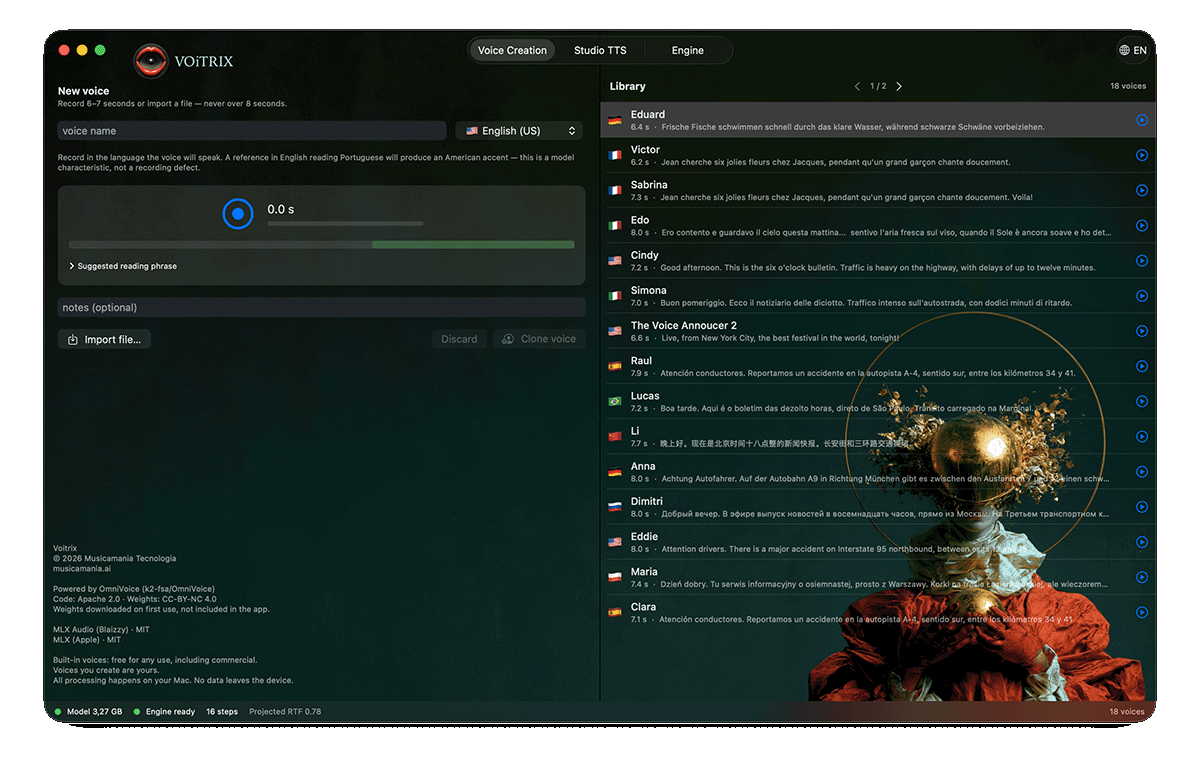
Not just another TTS app.
Voitrix runs the OmniVoice model — which benchmarks 2.85% word error rate against ElevenLabs' 10.95% — entirely on your Mac's GPU. No internet required after the initial model download.
Voice Cloning
8 seconds. That's it.
Record or import 8 seconds of any voice. Voitrix captures timbre, cadence, breath, and intention — then reproduces it in any of 646 languages. The reference stays on your Mac. Always.
Real-Time Streaming
Speaks before you finish reading.
Progressive chunking starts playback in about 5 seconds, then streams continuously. A 3-minute bulletin plays without interruption. The pipeline never runs dry.
Voice Design
Describe a voice. Hear it speak.
No reference needed. Type "female, 30, warm alto, british accent" and Voitrix creates a voice that never existed. Change the description, get a different person. Every voice is original.
Voice Blend
Voices that never existed.
Mix two reference recordings and create a third voice — a unique timbre born from the collision. Rough, warm, aged, bright: combinations no TTS can generate by design.
Expression Control
Prosody. Speed. Intention.
Sliders for prosodic variation, speed, and guidance strength. Lock the seed for reproducible readings. Every parameter is a creative decision, not a default.
Privacy by Architecture
Zero cloud. Zero exceptions.
The model runs on Apple Silicon via MLX. No audio, text, or voice data is transmitted anywhere. The only network request is the initial model download.
Three steps to your first voice.
Download the model
One-time download of ~3 GB. Stored in Application Support, shared across all Musicamania apps. After this, Voitrix works fully offline.
Record or import a voice
8 seconds of clear speech — read the suggested phrase or speak naturally. Voitrix transcribes automatically. Drag a WAV file in if you prefer editing first.
Type. Speak. Stream.
Paste any text, choose your voice, and press Speak. Audio starts in about 5 seconds and streams continuously. Export the WAV when you're done.
What people ask.
Is it really 100% local?
Yes. After the initial model download (~3 GB), Voitrix never contacts any server. You can disconnect from the internet and it works identically. No data ever leaves your Mac.
How accurate is the voice cloning?
OmniVoice achieves 0.830 speaker similarity (vs. 0.655 for ElevenLabs) and 2.85% word error rate (vs. 10.95%) in independent benchmarks. Quality depends on the reference recording.
Can I use it commercially?
Built-in voices are provided for unlimited commercial use. Voices you create — by recording, importing, or designing — are yours. Ensure you have consent when cloning another person's voice.
What Mac do I need?
An Apple Silicon Mac with the M4 chip and 16 GB of RAM (minimum). An M4 Mac Mini produces a 3-minute bulletin in about 100 seconds of synthesis, with audio starting in ~5 seconds.
What about cross-lingual cloning?
Yes — clone a voice in one language and generate speech in another. The accent of the reference carries over. For accent-free output, record a short reference in the target language.
How does Voice Blend work?
Mix two voice recordings as a single reference. The model cannot separate the two sources and creates a third, unique voice. Volume balance controls which characteristics dominate.